

Kindergarten, or “barnehage” in Norwegian, is a place where children from 1 to 6 years old can play, learn and socialise with other kids and adults. Let’s look how and where you need to reserve spot for your child.
First, you need to go to the website of your municipality, or “kommune” in Norwegian. Usually, you can find it by typing “yourmunicipalityname.kommune.no” in your browser. I will talk on example of: oslo.komunne.no
On the homepage, you will see a menu with different topics. Look for the word “barnehage” and click on it. This will take you to a page with all the information about kindergartens in Oslo.
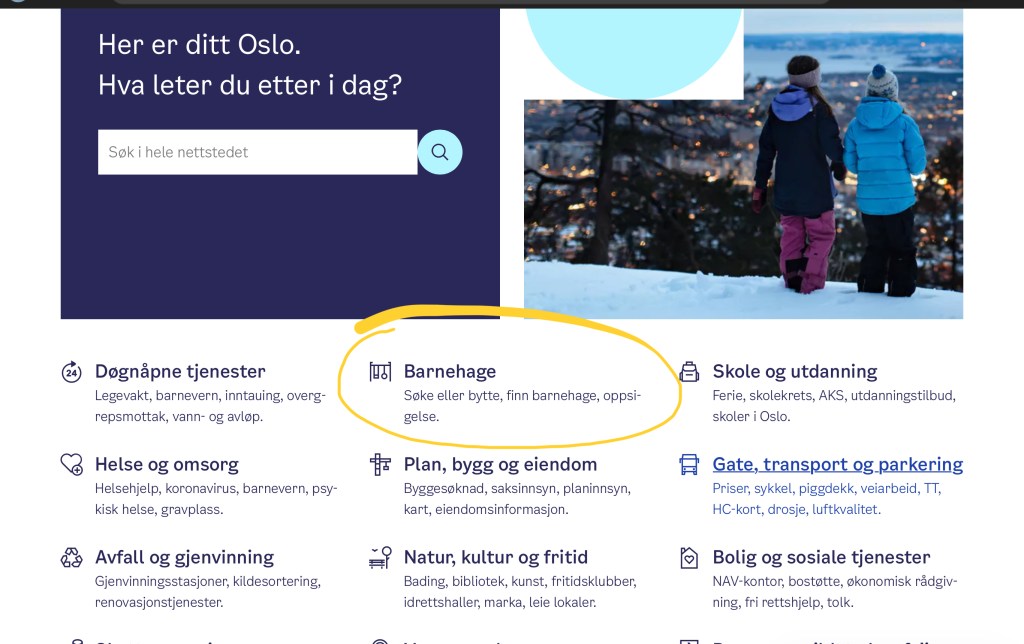
On this page, you will see a link that says “Søke eller bytte barnehage”, which means apply or change kindergarten. Click on this link to start your application.
You will need to have a personal number for yourself and your child. Your child also needs to be registered in the municipality where you want to get a kindergarten spot. You can register your child online or at the service center.
I recommend that you apply for a kindergarten spot as soon as your child receives their personal number and registration. If you plan to send your child to kindergarten immediately after your parental leave ends, it’s advisable to apply at least six months in advance. The application deadline for a start in August or September of the same year is March 1st.
Step 1
Before submitting your application, you can review a list of kindergartens to choose from. This list allows you to filter by district, type of kindergarten, and whether it is private or public. While there isn’t a significant difference between private and public kindergartens, private ones typically provide warm meals daily, albeit at a higher cost compared to public kindergartens.
You can also choose kindergartens based on their types if you have specific requirements. For instance:
- Family Kindergartens: These cater to small children from 6 months old. Typically, there are only 5 or 6 children attending, with 4 or 5 adults supervising.
- Company Kindergartens: These are specifically for children of employees from a particular company. They tend to be more expensive than other kindergartens.
- Student Kindergartens: Designed for children of students, these kindergartens offer specialized support. For example they keep opening hours longer in time of exams for student.
- Open Kindergartens: These are free and you have to accompany your child. They serve as a great alternative for socializing with other parents and children if you haven’t got a spot elsewhere.
Step 2
Once you have selected your preferred kindergartens, you can prioritize them. You have the option to choose up to five kindergartens. The higher you rank a kindergarten, the more likely you are to secure a spot there. Additionally, you can include comments or preferences in your application. For instance, you can specify whether you prefer a part-time or full-time spot, or if you have any special needs or requests.
Step 3
After selecting your preferred kindergartens, you can log in and start your application. You’ll need to provide your contact information, as well as the personal number of the second parent (if applicable). Next, arrange your chosen alternatives in order of desirability—from most preferred to least. You’ll also need to specify the type of place you’re seeking (full-time or part-time). If you belong to a priority group, such as being a single parent, having older children in the same kindergarten, being a refugee, or having a child with disabilities, make sure to indicate that. These factors grant you priority status, increasing your chances of securing a spot. You can find description of this groups HERE.
Step 4
On the next page, you will be asked to upload a document that demonstrates your right for a priority group. This document could be a certificate, a letter, or proof of income. Once you’ve uploaded the necessary document, you can click the ‘send’ button to submit your application.
After completing your application, you can submit it online. You’ll receive a confirmation email containing your application number. Additionally, you can check the status of your application on the website. By April 15th, you’ll receive an answer. If you secure a spot, you’ll need to accept or decline it by May 1st. If you don’t receive a spot, you’ll be placed on a waiting list. Remember that you can modify or cancel your application at any time before the deadline.
If you want a visual on how to do it, please check out this video, where I show how to fill out application in real time⬇️
 Maria Markes